A realistic ride through a town square
The camera follows a pelican on a bicycle past storefronts and striped awnings.
ChetasLua · @chetaslua
Claude Fable 5.2 · Blender
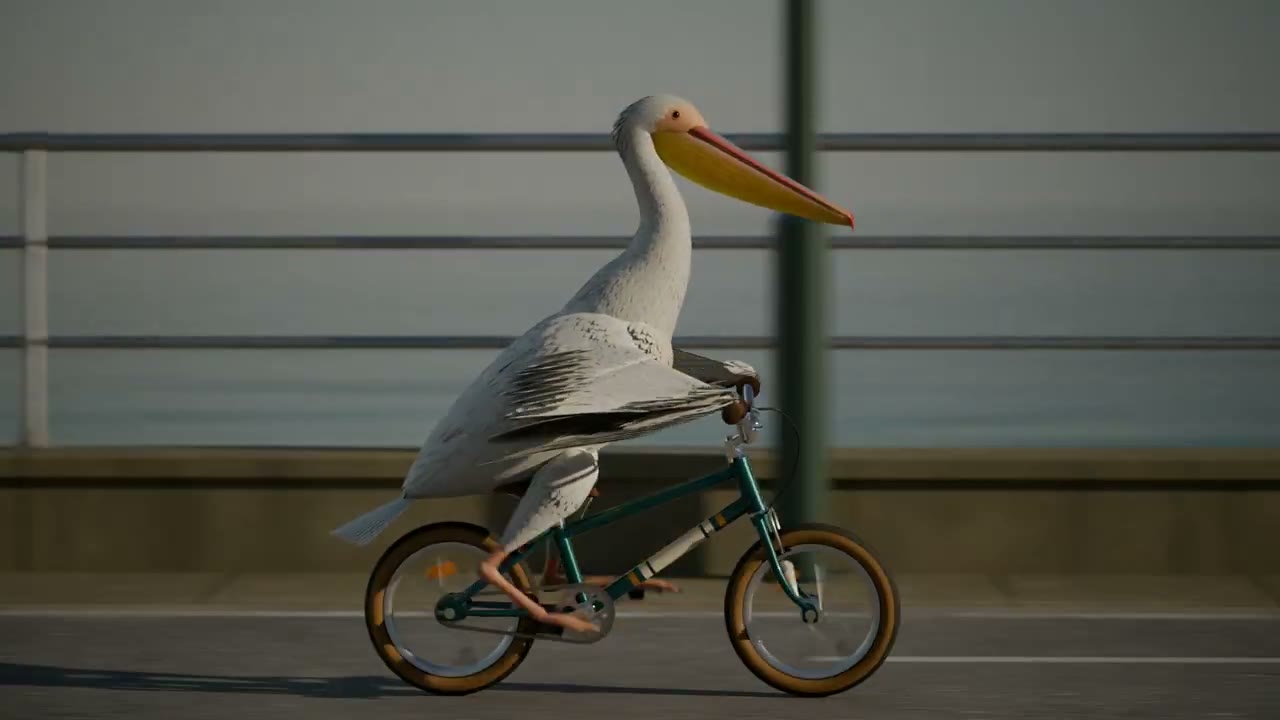
A pelican rides a teal bicycle along the seafront. Tech Friend AJ’s Blender short follows the ride from five camera angles, including a close-up of the pedals and drivetrain.
Two creators recorded 3D street rides. ChetasLua described the model routing as “Fable 5.5 / Opus-Next” in the original post. The routing remains unverified.
The camera follows a pelican on a bicycle past storefronts and striped awnings.
ChetasLua · @chetaslua
A moving 3D camera follows the pelican down a street.
Addy Osmani · @addyosmani
Both models received the same prompt. Each returned a Canvas drawing function, which we ran through the same CineCode capture script at 1280 × 720 and 24 fps.
The Fable 5.2 scene ties the boardwalk to the distance covered by six wheel turns. In the Terra scene the wheels turn four times while the boardwalk moves 160 pixels, making the tires appear to slip. Both runs return to their opening frame at eight seconds.
Google’s Gemini 4 Carbon demo takes the idea into a playable 3D bike ride. Follow Google’s link for that run. The two videos here are our local exports. Gemini 4 Carbon
Qwen4-Max Preview is also being tried on this subject. The published community example shows a coastal ride built in Three.js. Our Qwen Chat attempts did not return a drawing function we could render. Qwen4-Max Preview · Community example
The two stills show frame 48 of the same reference scene. Open pelican.html?frame=teal to see the edited ride. The frame color comes from one setting in pelican.js, while the rider and timing share the original code.


Unzip the project, then open pelican.html in Chrome for a preview. Run these commands in the project folder with Node.js 22+, Chrome or Chromium, and FFmpeg. Each command writes an MP4 and a cover to exports.
node render.mjs pelican ./exports
node render.mjs pelican-fable ./exports
node render.mjs pelican-terra ./exportsCreate a deterministic, 8-second looping Canvas 2D animation called “The Tidal Route”: a recognizable pelican riding a bicycle from left to right along a coastal boardwalk. 1280x720, 24 fps. Use a side-on camera with cinematic editorial illustration: desaturated teal water, dark navy shadows, warm peach dawn and a coral bicycle frame. Use a layered moving harbor backdrop, with a clear silhouette and no text.
The pelican has a long beak and visible pouch, sits on the saddle, reaches the handlebars, and pedals with both feet attached to opposite pedals. Wheels, background travel, and pedals should be mechanically coherent. Make the seam close at 8 seconds. The time argument is in seconds. Leave enough space around the bicycle to read the movement. Use only procedural drawing. No external assets, fetches, Web Audio, asynchronous code, page access, libraries, or randomness per frame.
Output only valid JavaScript defining function drawPelican(ctx, time) for an existing player that handles the canvas, preview and frame capture. Use Canvas 2D calls on ctx and local helpers inside the function. No markdown fences or explanation. Aim for 150–240 lines.Simon Willison’s original pelican test asks for a static SVG. Here, the Canvas scene draws each frame at a fixed time, CineCode’s capture utility records it in headless Chrome, and FFmpeg packages the MP4. The reference version also adds a synthesized bicycle bell.
Gemini Omni 1.2 Flash is a separate workflow for native video generation and editing. Google documents clips of up to 15 seconds. The code project above lets you inspect and modify the animation one frame at a time.