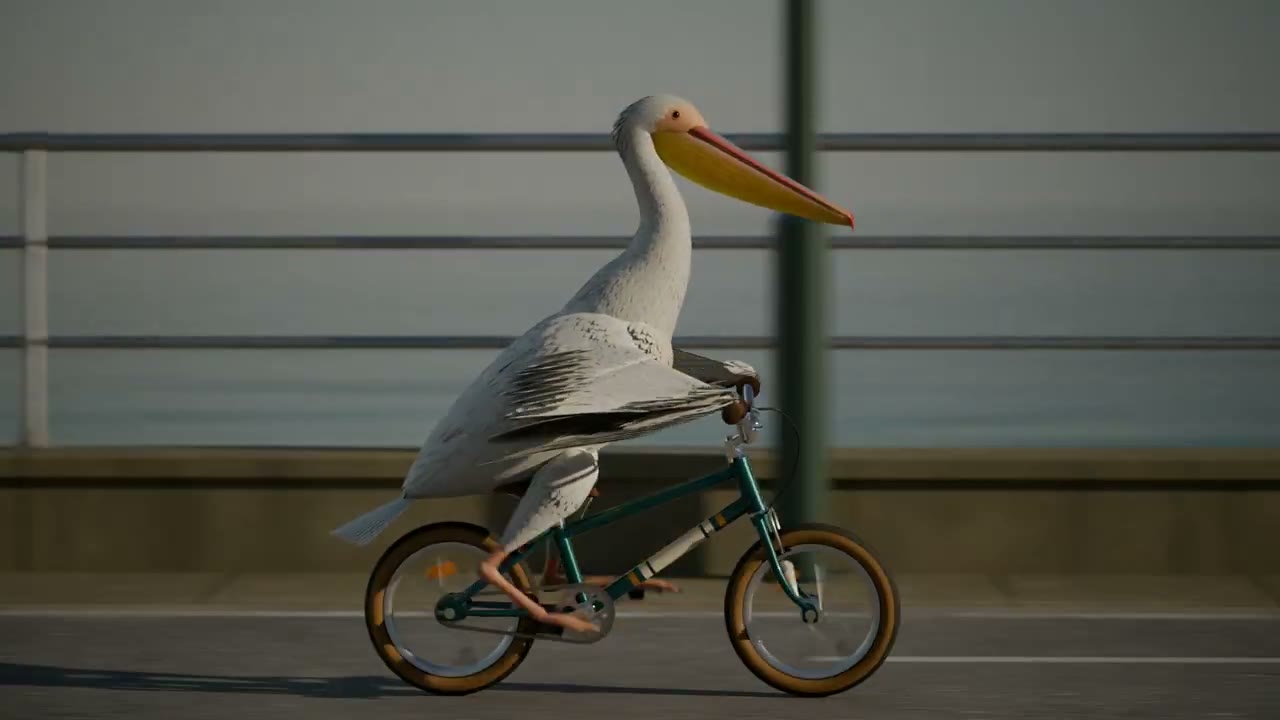
写实街景里的鹈鹕骑行
镜头跟着鹈鹕骑过店面、条纹遮阳篷和石板广场。
ChetasLua · @chetaslua
Claude Fable 5.2 · Blender
一只鹈鹕骑着青绿色自行车沿海滨前行。Tech Friend AJ 的 Blender 短片用五个机位呈现这段骑行,其中有踏板和传动系统的特写。
两段创作者公开的三维街景骑行视频。ChetasLua 在原帖中将模型路由描述为「Fable 5.5 / Opus-Next」,实际路由仍待核实。
镜头跟着鹈鹕骑过店面、条纹遮阳篷和石板广场。
ChetasLua · @chetaslua
在三维场景里,镜头跟着鹈鹕穿过阳光下的街道。
Addy Osmani · @addyosmani
两个模型收到同一份提示词,各自返回 Canvas 绘制函数。我们用同一版 CineCode 捕获脚本,在 1280 × 720、24 帧每秒的条件下导出。
Fable 5.2 按车轮转六圈的滚动距离移动栈道。Terra 的车轮转四圈时,栈道只移动了 160 像素,画面里能看出轮胎像在打滑。两段动画在 8 秒时都回到了开头画面。
Google 的 Gemini 4 Carbon 演示把鹈鹕骑车做成了可玩的 3D 场景,可到 Google 发布页查看。这里并排展示的是本站实际渲染的两个样片。 Gemini 4 Carbon
社区也用 Qwen4-Max Preview 做了海边骑车的 Three.js 动画。我们在 Qwen Chat 的尝试没有返回可渲染的绘制函数,可查看创作者公开的样例。 Qwen4-Max Preview · 社区样例
两张图都来自本站参考动画的第 48 帧。用 Chrome 打开 pelican.html?frame=teal 可以预览改色版。车架颜色由 pelican.js 的一个设置控制,动作和时序共用原来的代码。


解压项目后,用 Chrome 打开 pelican.html 预览。在项目目录运行下面的命令。环境需要 Node.js 22 或更高版本、Chrome 或 Chromium,以及 FFmpeg。每条命令都会把 MP4 和封面存到 exports。
node render.mjs pelican ./exports
node render.mjs pelican-fable ./exports
node render.mjs pelican-terra ./exportsCreate a deterministic, 8-second looping Canvas 2D animation called “The Tidal Route”: a recognizable pelican riding a bicycle from left to right along a coastal boardwalk. 1280x720, 24 fps. Use a side-on camera with cinematic editorial illustration: desaturated teal water, dark navy shadows, warm peach dawn and a coral bicycle frame. Use a layered moving harbor backdrop, with a clear silhouette and no text.
The pelican has a long beak and visible pouch, sits on the saddle, reaches the handlebars, and pedals with both feet attached to opposite pedals. Wheels, background travel, and pedals should be mechanically coherent. Make the seam close at 8 seconds. The time argument is in seconds. Leave enough space around the bicycle to read the movement. Use only procedural drawing. No external assets, fetches, Web Audio, asynchronous code, page access, libraries, or randomness per frame.
Output only valid JavaScript defining function drawPelican(ctx, time) for an existing player that handles the canvas, preview and frame capture. Use Canvas 2D calls on ctx and local helpers inside the function. No markdown fences or explanation. Aim for 150–240 lines.Simon Willison 的经典测试要求生成一张静态 SVG。这里用 Canvas 按时间绘制每一帧,交给 CineCode 捕获脚本在无界面 Chrome 中渲染,再通过 FFmpeg 封装为 MP4。本站参考动画还用代码合成了车铃声。
Gemini Omni 1.2 Flash 提供原生视频生成和编辑,Google 文档标注单段最长 15 秒。上面的代码项目可以逐帧查看、修改动作,再用同一条命令导出。